filmcraft Hailuo 2.3 Pro for Focused 1080p Visual Performances
Develop a gesture, interaction, or moment of attention with filmcraft Hailuo 2.3 Pro on H3 Max. Work from a written scene or one opening image and shape the idea into six seconds of video. filmcraft Hailuo 2.3 Pro keeps the starting workflow simple while you concentrate on the action the viewer should understand.
Video workspace
The wooden elevator opens
28/45View prompt
Five-second continuous frontal shot of closed wooden elevator doors opening slowly to reveal one adult woman standing inside. Keep the camera fixed at eye level and the woman relaxed, facing forward. Preserve a simple, balanced composition with warm wood grain and soft interior light. End with the doors open and the woman still standing.
Introduction
What Is filmcraft Hailuo 2.3 Pro?
filmcraft Hailuo 2.3 Pro is the Pro variant of MiniMax Hailuo 2.3, with official fal routes for text-to-video and image-to-video generation.
Generation from a scene or a first frame
The fal model pages describe filmcraft Hailuo 2.3 Pro as a 1080p video model. Its text route accepts a scene prompt, while its image route uses one supplied picture as the first frame. filmcraft Hailuo 2.3 Pro does not use that picture as a general album of references. It starts from a concrete view and generates how the scene develops from there.
A six-second workflow with one image input
H3 Max offers filmcraft Hailuo 2.3 Pro at 1080p with a six-second duration. In image mode, provide one opening picture; this configuration does not include a second ending image. Text mode needs no picture. Choose the mode that matches your starting material and review the displayed credits. There is no audio control here, so treat required sound as a separate production task.
How to use
How to Work with filmcraft Hailuo 2.3 Pro
- PromptSTEP 1
Start from the right material
Select filmcraft Hailuo 2.3 Pro in H3 Max. Use a written scene for text mode or upload one clear starting image for the image-led workflow.
- ModelHailuo 2.3 Pro1080p16:96sPromptSTEP 2
Describe the visible performance
Tell filmcraft Hailuo 2.3 Pro what moves, how the camera behaves, and where the action settles. Keep the request compatible with a single six-second shot.
- First frameLast frame
 0.0s
0.0s 2.9s
2.9s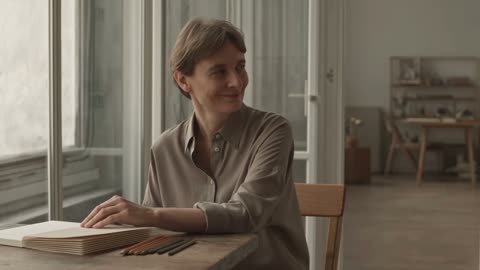 5.3sSTEP 3
Check the request before submission
Confirm 1080p and six seconds, review the opening image when present, and read the displayed credits. Remove instructions that conflict with the planned action or composition.
- Create one six-second medium shot of an adult illustrator seated beside a large studio window. They pause over a closed sketchbook, glance toward the doorway, and give a small natural smile. Keep the camera locked and the window light consistent. Make the gesture restrained and readable. No speaking, extra people, changing furniture, exaggerated movement, or cuts.DownloadSTEP 4
Evaluate and refine the motion
Watch the filmcraft Hailuo 2.3 Pro result continuously. Check gesture, contact, and continuity, then make the next request address one observed issue rather than rewriting every part of the scene.
Features
Shape a Readable Gesture with filmcraft Hailuo 2.3 Pro
A small performance gives filmcraft Hailuo 2.3 Pro something specific to express without asking a short clip to carry several emotional turns.
Name an observable action instead of an abstract mood
Translate a feeling into something the viewer can see. Ask filmcraft Hailuo 2.3 Pro for an adult subject to pause, glance toward a doorway, and give a restrained smile, rather than merely requesting confidence or surprise. Keep the sequence compact. filmcraft Hailuo 2.3 Pro should be judged on the visible gesture and its timing, not on whether a prompt contains enough descriptive adjectives.
Choose framing that makes the gesture legible
A hand movement needs a clear view of the hand; a change of gaze needs a face that is not obscured. Prepare filmcraft Hailuo 2.3 Pro with a composition suited to the performance. Avoid asking for an intimate expression while placing the person far away in a crowded setting. Check the resulting eyes, hands, and posture throughout the motion, not just at the opening frame.
Describe Contact and Weight for filmcraft Hailuo 2.3 Pro
For an object interaction, give filmcraft Hailuo 2.3 Pro a simple relationship between the moving subject, the item, and its supporting surface.
Keep the physical event easy to understand
A hand placing a notebook on a table is a clearer test than several objects being exchanged simultaneously. Tell filmcraft Hailuo 2.3 Pro where the notebook begins, how it moves, and where it comes to rest. Describe the intended pace without promising exact physics. A filmcraft Hailuo 2.3 Pro brief can establish contact and weight as goals that you examine in the returned scene.
Inspect filmcraft Hailuo 2.3 Pro contact between surfaces
Pause when a finger touches an object, a base meets a tabletop, or fabric folds against a body. These moments deserve particular attention in filmcraft Hailuo 2.3 Pro output because their appearance can determine whether an interaction reads convincingly. Reject distracting intersections or changing proportions. Simplifying the movement is often a useful next experiment when an elaborate action produces an unclear physical relationship.
Animate One Starting View with filmcraft Hailuo 2.3 Pro
One opening picture can establish the visual context for filmcraft Hailuo 2.3 Pro while the prompt explains what should happen next.
Choose the image around the planned movement
A tightly cropped source may suit a small head turn, while a full-body movement needs space around the person. Match that preparation to your filmcraft Hailuo 2.3 Pro idea. Use a clear, deliberate starting pose and avoid conflicting visual cues. Tell filmcraft Hailuo 2.3 Pro which visible clothing, colors, and background relationships should remain recognizable as the requested action unfolds over the shot.
Describe the filmcraft Hailuo 2.3 Pro ending in words
Although this workflow has no ending-image input, you can describe a desired resting state in words. Ask filmcraft Hailuo 2.3 Pro for the subject to return to a relaxed posture or for an object to settle on its support. Treat that as direction, not a locked final frame. Review how naturally the action arrives there within the six-second clip rather than evaluating the finish alone.
Guide Light and Attention in filmcraft Hailuo 2.3 Pro
Use a coherent visual emphasis in filmcraft Hailuo 2.3 Pro so the viewer knows which movement matters and where to look first.
Build the text scene around a clear subject
When working without an image, describe the subject, its position, the surroundings, and one lighting setup before the action. filmcraft Hailuo 2.3 Pro does not need a long inventory of every background item. Select a few details that explain the place. Keep the filmcraft Hailuo 2.3 Pro prompt organized so the visual setting supports the performance rather than competing with it for attention.
Avoid changing everything at the same time
A moving subject, circling camera, shifting lights, and busy background can make a simple action difficult to read. For filmcraft Hailuo 2.3 Pro, decide which change is essential and keep the others restrained. A stable camera can serve a gesture; a gentle approach can serve a still object. Examine whether the result directs attention to the same detail you intended to emphasize.
Review filmcraft Hailuo 2.3 Pro as a Moving Scene
The useful result from filmcraft Hailuo 2.3 Pro is a coherent six-second performance, not merely an attractive collection of individual frames.
Inspect continuity at the delivered size
Watch the full clip at normal speed before examining difficult moments at 1080p. filmcraft Hailuo 2.3 Pro details such as clothing edges, object outlines, and facial features should be checked across the action. A single attractive frame cannot establish that they remain stable. Compare filmcraft Hailuo 2.3 Pro output with the source image when present, and judge whether changes interfere with the scene you need.
Give the next revision one specific objective
Choose a concrete adjustment after watching the filmcraft Hailuo 2.3 Pro result: reduce the gesture, keep the camera still, or remove an unnecessary object interaction. Preserve the successful parts of the brief. Before another filmcraft Hailuo 2.3 Pro request, review the workspace credits and save the relevant input picture and prompt. That record helps you distinguish a useful revision from an unrelated new interpretation.
Example prompts
Text: a small moment of recognition
Create one six-second medium shot of an adult illustrator seated beside a large studio window. They pause over a closed sketchbook, glance toward the doorway, and give a small natural smile. Keep the camera locked and the window light consistent. Make the gesture restrained and readable. No speaking, extra people, changing furniture, exaggerated movement, or cuts.
Image: a grounded object interaction
Use the uploaded image as the opening frame. Over six seconds, let the visible adult subject gently lower the object already held in their hands onto the existing table. Keep their appearance, clothing, and the item recognizable. Maintain believable contact and a stable camera. End with the object resting. Do not introduce additional objects or change the setting.
Image: fabric and a controlled turn
Start from the supplied image of the adult subject. Create a six-second shot in which they make a slight natural turn, allowing the visible garment to move gently and settle. Aim to preserve its cut, color, and visible details. Keep the camera and lighting stable. Avoid dramatic poses, new accessories, additional people, or a scene transition.
User reviews
filmcraft video creator feedback.
filmcraft creator reviews

I made a full character PV for my game with MiniMax H3 in one afternoon. The menu UI stayed readable in every frame and the character never went off-model. That used to cost me a contractor and three weeks.

We tested every AI video generator on the market for stylized work. H3 is the only one that held our anime style across cuts. We now use it for pitch reels and animatics on every project.

I uploaded four product photos and got a listing video with music and a voiceover the same day. My click-through rate on the new listings is up 38%. H3 even got the label text on my packaging right.

I ship five vertical videos a week for three brands. MiniMax H3 gets me from brief to draft in under an hour, with sound already synced. My old workflow needed a videographer and two review rounds.

The editing side is what sold me. A client wanted the background of an interview changed — I typed one sentence into MiniMax H3 and the lighting on the subject matched the new scene automatically.

I previsualized my entire short film in MiniMax H3 before we shot a single frame. Rack focus, match cuts, even the title cards — it understands director language, not just keywords.
filmcraft Pricing and Credit Plans
Cancel anytime
Lite
50% off0.025 / credit
Billed $ yearly179· Save $179.8
Video Models


Image Models



- Includes MiniMax H3 and all premium models
- Up to 1 batch generation task
- Standard generation speed
- Standard generation success rate
- Standard customer support
- Commercial Use License
Standard
50% off0.017 / credit
Billed $ yearly299· Save $299.8
Video Models
Image Models
- Includes MiniMax H3 and all premium models
- Up to 4 batch generation tasks
- Priority processing speed
- High generation success rate
- Priority customer support
- Commercial Use License
Pro
50% off0.014 / credit
Billed $ yearly599· Save $599.8
Video Models
Image Models
- Includes MiniMax H3 and all premium models
- Up to 10 batch generation tasks
- Fastest generation speed
- High generation success rate
- Dedicated account manager
- Commercial Use License
Max
50% off0.012 / credit
Billed $ yearly1,199· Save $1,199.8
Video Models
Image Models
- Includes MiniMax H3 and all premium models
- Up to 10 batch generation tasks
- Fastest generation speed
- High generation success rate
- Dedicated account manager
- Commercial Use License
Pay safely and securely with























FAQ
Frequently asked questions
What are the filmcraft Hailuo 2.3 Pro settings on H3 Max?
This model uses a six-second duration and 1080p output in the current workspace. Choose text mode or image mode according to your starting material, then verify the request before submitting it.
Can filmcraft Hailuo 2.3 Pro use two endpoint images?
No. Image mode here accepts one opening image, not an opening and closing pair. You may describe a desired ending in the prompt, but that instruction does not act as a supplied final frame.
Is an image necessary for filmcraft Hailuo 2.3 Pro?
Only in image mode. Text mode creates the scene from a written description. Explain the main subject, its surroundings, and the visible action, with a camera direction that supports the intended performance.
Does filmcraft Hailuo 2.3 Pro guarantee a realistic human gesture?
No generation is guaranteed to preserve every detail or produce a convincing performance. Review expression, anatomy, timing, and interactions throughout the clip. Use a smaller, clearer action when the initial request proves too complicated.
Can I control audio in filmcraft Hailuo 2.3 Pro?
No audio switch is provided in this workflow. Do not plan around promised dialogue or native sound. Develop the visual performance first and handle any necessary soundtrack separately in your production process.
How can I preserve an item in filmcraft Hailuo 2.3 Pro?
Begin with a clear image when the actual item matters. Name its important visible features and keep the requested movement limited. Compare the entire output with the source before accepting changes to shape, markings, or proportions.
How much does a filmcraft Hailuo 2.3 Pro request cost?
Read the credits displayed in the workspace for the configured request. The page does not quote an exact universal price. Review that amount before each generation and decide what a revision is intended to improve.
CTA
Develop a Clear Moment with filmcraft Hailuo 2.3 Pro
Choose a gesture or interaction worth observing. Prepare one image or a written scene, review the credits, and use filmcraft Hailuo 2.3 Pro to explore how that moment plays in motion.
Create a Visual Performance